Task list your AI agents can read and edit
The Plaintask MCP server gives Claude, Cursor and any MCP client six tools for the tasks in your Markdown files. Each change an agent makes is one line you can read.
Open source on GitHub, with the Plaintask app and CLI.
Agents work in the files you read
One task is one line
A tool call adds or edits a checkbox line, with its date, deadline and tags after it. Nothing is hidden in a database.
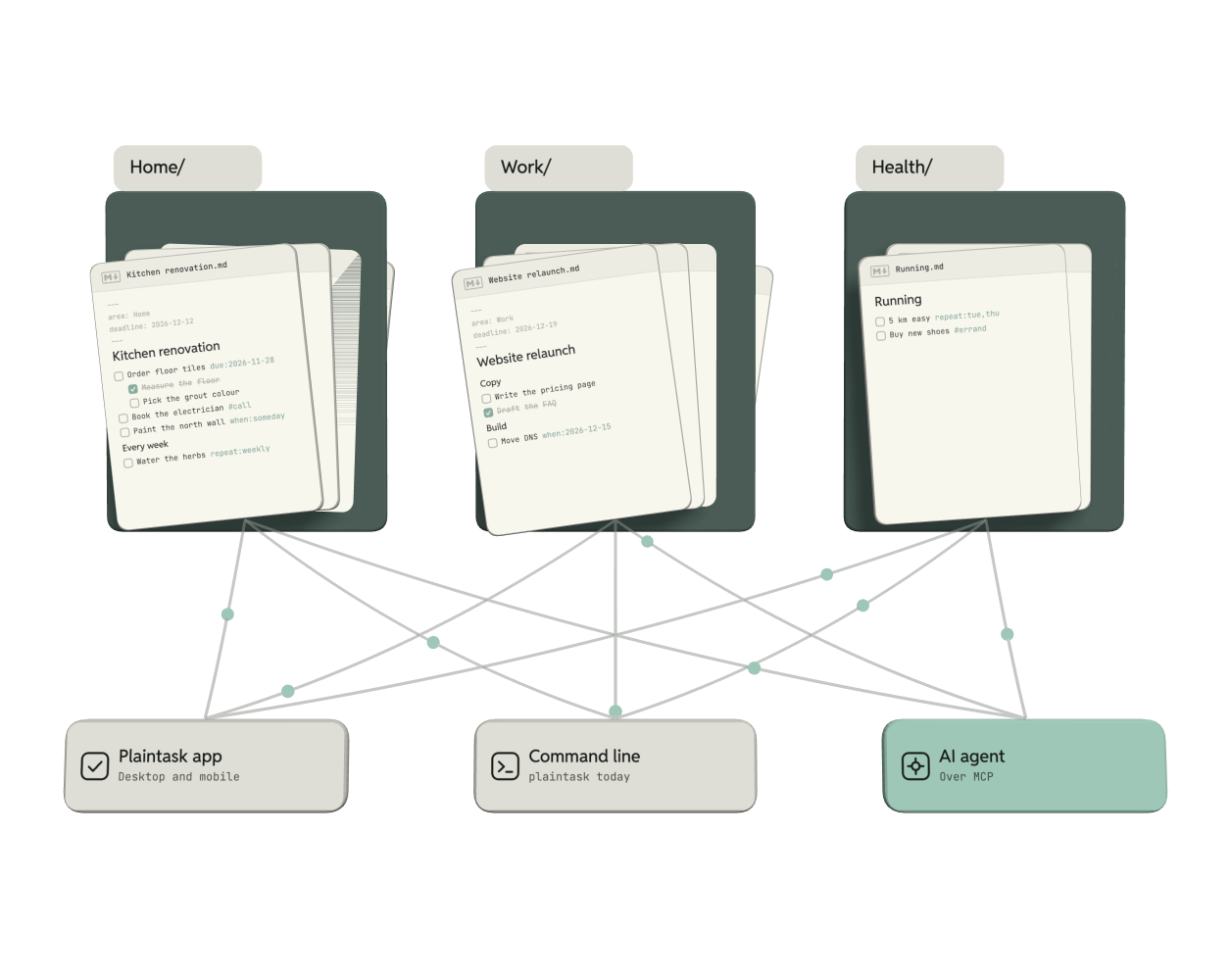
Projects are Markdown files, areas are folders
Agents ask for a project or an area by its name; the server maps it to a .md file or a folder in your task root.
Agents, the app and the CLI share them
Over MCP an agent opens the same folder as the Plaintask app and the command line, so you see its changes at once.
Every tool call, beside the file it changed
The Plaintask app lists each call an agent made. Open one to see its diff, with the agent's reason, and apply or drop the change.
- Cupdate_taskBook the electrician · when TueWaitingnow
- Cupdate_taskClear the old cabinets · when ThuWaitingnow
- Cupdate_taskGet two quotes · when MonWaitingnow
- Clist_tasksKitchen renovation · 5 openRead1m
- Uadd_taskReply to the venue · Inbox.mdApplied14m
- Ucomplete_taskWater the herbs · next Sun 29Applied2h
- Csearch_tasks"invoice" · 2 foundRead3h
- Uadd_taskDraft the budget · Q1 planningApplied5h
- Clist_projectsWork · 5 projectsRead5h
- Uupdate_taskWrite the pricing page · due 3 DecApplied1d

Six MCP tools for your tasks
Three read and three write. Start the server with --read-only and an agent gets only the first three.
list_tasksLists tasks by view, project, area, tag or dateadd_taskWrites a new task line to Inbox.md or a projectupdate_taskChanges a task’s title, dates, tags or projectcomplete_taskTicks a task off and writes the next repeatlist_projectsLists areas and projects with their deadlinessearch_tasksFinds tasks by words in their line or notes
 add_task schema
// tools/list, as the client sees it
{
  "name": "add_task",
  "description": "Write a new task line to Inbox.md or a project file",
  "inputSchema": {
    "type": "object",
    "properties": {
      "title":   { "type": "string" },
      "project": { "type": "string" },
      "when":    { "type": "string", "format": "date" },
      "due":     { "type": "string", "format": "date" },
      "tags":    { "type": "array" }
    },
    "required": ["title"]
  }
}
Works with any MCP client
The server speaks the Model Context Protocol over stdio, so any client that runs MCP servers can use it: chat apps, coding agents and editors.
- Claude Desktop and Claude Code
- Cursor, Visual Studio Code with GitHub Copilot, Codex
- Your own agent, through any MCP SDK
Add the server in one step
Point the server at your task folder with --root. It runs on your machine and sends your tasks nowhere.
Run one command, then ask Claude about your tasks in any project folder.
Add the entry to claude_desktop_config.json and restart Claude.
Add the entry to .cursor/mcp.json. This one is read-only.
$ claude mcp add plaintask -- npx -y plaintask-mcp --root ~/Tasks
✓ Added stdio MCP server plaintask

$ claude
> What is due this week?
  plaintask · list_tasks { due: "this-week" }
  Four tasks: the tile order on Friday, the water bill on Monday …
// claude_desktop_config.json
{
  "mcpServers": {
    "plaintask": {
      "command": "npx",
      "args": ["-y", "plaintask-mcp", "--root", "~/Tasks"]
    }
  }
}
// .cursor/mcp.json
{
  "mcpServers": {
    "plaintask": {
      "command": "npx",
      "args": ["-y", "plaintask-mcp", "--root", "~/Tasks", "--read-only"]
    }
  }
}
Why Plaintask keeps agent changes in files
An agent should change your list the way you do: one line at a time, in a file you can open, with Git keeping the history.

 Plain Markdown files, with their history in Git™.
Questions
About the Plaintask MCP server, your files and what agents can do.
- Inbox.md4 tasks
- Home4 files
- Work5 files
- Health3 files
Does the server send my tasks anywhere?
No. It runs on your machine over stdio and reads only the folder you pass as --root. The agent's model sees what its tool calls return.
Can an agent delete tasks?
No. The six tools can add, edit and complete tasks. Deleting a line is left to you.
How do I undo an agent's change?
Drop it in the agent log before it is applied, or revert the line in Git.
Is the MCP server free?
Yes. It is open source, with the Plaintask app and the CLI. Plaintask Pro adds paid sync.
Which folder layout does the server expect?
The Plaintask layout: Inbox.md at the root, a folder per area and a Markdown file per project.
Do I need the Plaintask app?
No. The server works on any folder of task files; the app adds the agent log and review.